

A small business website loses customers when it loads slowly, lacks mobile optimization, has unclear calls-to-action, or fails to rank on search engines. These small business website mistakes silently push visitors away, often before a business owner even notices the traffic drop. The good news: every one of these issues is fixable.
And here’s a number that still shocks people: 53% of mobile users abandon a site that takes more than 3 seconds to load (Source: Google/Think with Google). That’s not a small percentage. That’s more than half your potential customers walking out the door before they even read a single word you wrote.
How Do I Know If My Website Is Losing Customers?
Before you fix anything, you need to figure out what’s actually broken. I learned this the hard way years ago. I had a client, a plumber in Ohio, great guy, who was convinced his website was performing just fine because it looked nice. He’d paid good money for it. But his phone wasn’t ringing. When we dug into the data, his homepage was taking 11 seconds to load on mobile. Eleven seconds. That’s an eternity online.
The point is: feelings aren’t data. Let’s look at what the numbers are actually telling you.
What do high bounce rates actually mean for my business?
A bounce rate is the percentage of visitors who land on your page and leave without clicking anything else on your site. People confuse this with exit rate all the time, so let’s clear it up fast.
Bounce rate: someone lands on a page and leaves without visiting another page. Exit rate: the percentage of people who left from a specific page, but they may have visited other pages first. Both matter, but for different reasons.
Here’s what normal looks like by industry, so you know when to worry:
- 20-45%: Retail/e-commerce websites
- 25-55%: B2B and service websites
- 30-55%: Lead generation pages
- 65-90%: Blogs and content sites
If you’re running a plumbing company and your homepage has a 78% bounce rate, that’s a problem. But if you’re running a recipe blog and your articles sit at 80%, that’s actually pretty normal. Context matters.
Which free tools can I use to check my website’s health right now?
Good news: you don’t need to spend a dollar to figure out what’s going wrong. These five tools cover pretty much everything.
| Tool | What It Measures | Cost |
| Google Analytics 4 | Traffic, sessions, bounce rate, user behavior | Free |
| Google Search Console | Search rankings, indexing issues, click-through rates | Free |
| PageSpeed Insights | Page load speed, Core Web Vitals scores | Free |
| Hotjar / Microsoft Clarity | Heatmaps, session recordings, click maps | Free (basic) |
| Semrush / Ahrefs | Keyword rankings, backlink profile, site audit | Paid (trial free) |
Start with Google Search Console and PageSpeed Insights. Those two alone will tell you 80% of what you need to know. And they’re completely free.
What Are the Biggest Small Business Website Mistakes That Drive Customers Away?
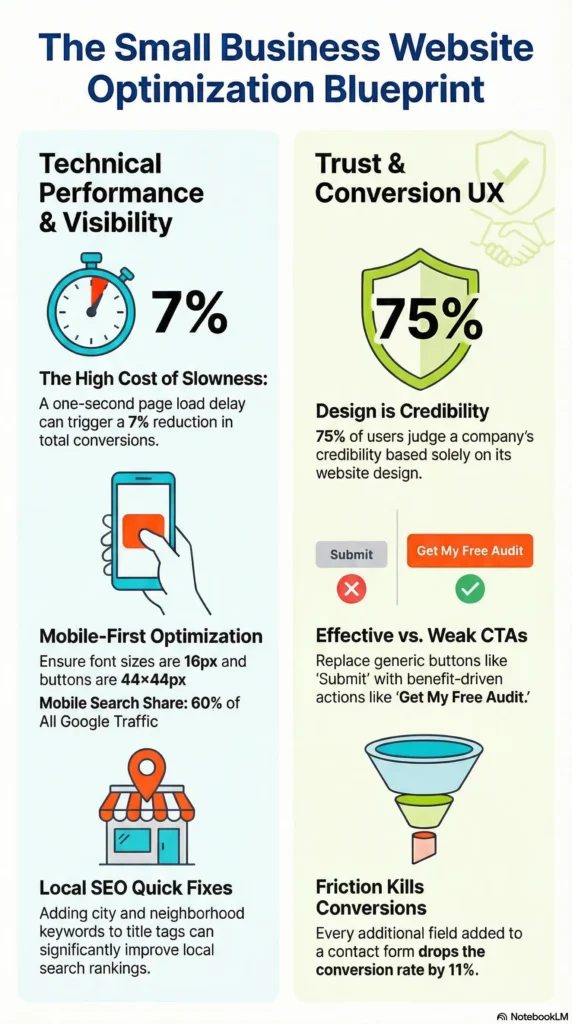
Alright, here’s the part most people skip straight to, and honestly, I don’t blame you. Let’s go through the seven biggest culprits, one by one.
#1: Why is my website so slow, and how much is it costing me?
Slow websites don’t just frustrate users. They actively cost you money.
Stat: A 1-second delay in page load time can lead to a 7% reduction in conversions (Source: Akamai). If your site makes $10,000 a month and loads two seconds slower than it should, you’re potentially leaving $1,400 on the table every single month.
The three technical things that slow down most small business websites are:
- Uncompressed images. A 4MB product photo looks the same as a 200KB compressed version, but one loads 20x slower.
- Bad hosting. Cheap shared hosting is fine for a personal blog. It’s a silent killer for a business website.
- Too many plugins. Every plugin on your WordPress site adds load time. Most sites have 20+ plugins installed. Half of them are doing nothing useful.
Quick wins you can do today: compress your images with TinyPNG, enable browser caching through a plugin like WP Rocket, and delete any plugins you haven’t used in the last 90 days.
#2: Is my website hurting you on mobile devices?
Over 60% of all Google searches now come from mobile devices (Source: Statista, 2024). And Google uses mobile-first indexing, which means it’s crawling and ranking the mobile version of your site, not the desktop version.
So if your mobile experience is bad, your rankings are suffering, whether your desktop site looks amazing or not. Here’s what to check:
- Run your URL through Google’s Mobile-Friendly Test (free, takes 30 seconds)
- Make sure your font size is at least 16px for body text
- Check that buttons are big enough to tap with a thumb, at least 44×44 pixels
- Remove any pop-ups that block the main content on mobile (Google penalizes these)
#3: Why can’t customers find my website on Google?
This one is so common it’s almost predictable. Most small business websites have basic SEO issues that are easy to fix once you know about them.
Real-World Example: A bakery in Denver had zero location keywords on its homepage. The title just said ‘Fresh Baked Goods’ with no city or neighborhood. After adding ‘Denver bakery’ to the H1 tag and the page title, they ranked on page one within eight weeks. Same website. Almost no other changes.
The most common SEO problems on small business sites:
- Title tags that don’t include the primary keyword or location
- Missing or duplicate meta descriptions
- No XML sitemap submitted to Google Search Console
- Pages accidentally set to ‘noindex’ (this happens more than you’d think after a website update)
- No internal linking between related pages
#4: Do confusing navigation and poor UX push visitors away?
Stanford’s Web Credibility Research found that 75% of users judge a company’s credibility based on website design. That’s not just about colors and fonts. It’s about whether your site is easy to use.
The most common UX mistakes on small business sites:
- Stick to 5 or fewer top-level menu items. More than that overwhelms people.Navigation menus with 10+ items.
- Visitors should know exactly what you do and who you serve within 5 seconds of landing.No clear value proposition above the fold.
- Every page needs one primary call-to-action. One. Not four.Multiple competing CTAs on one page.
- Install Microsoft Clarity (free) and watch where people actually click. You’ll be surprised.Dead zones nobody clicks.
#5: Is outdated or thin content causing my traffic to drop?
Google rewards fresh, useful content. If your blog post was written in 2018 and hasn’t been touched since, Google notices. And not in a good way.
Thin content, meaning pages under 300 words with little real value, is something Google’s algorithm actively penalizes. But the sneaky one is keyword cannibalization. That’s when you have two or three pages all targeting the same keyword, and they end up competing against each other instead of working together.
The fix is straightforward: audit your top 20 pages in Google Analytics. Find the ones with high bounce rates and short time-on-page. Then either update them with fresh information, consolidate them with a stronger page, or redirect them somewhere more relevant.
#6: Is my website building or destroying trust with visitors?
Trust isn’t just a feeling. It’s technical and visual, and your website is either building it or burning it. Ask yourself:
- Does your site show ‘Not Secure’ in the browser bar? No SSL certificate means Chrome flags it in red. It scares people off instantly.
- Do you have real customer reviews visible without scrolling down?
- Are you using generic stock photos of fake-smiling people in blazers, or actual photos of your team and work?
- Do you have an About page? People want to know who they’re buying from.
Any one of these can quietly tank your conversion rate without you ever knowing why.
#7: Why are visitors not converting even when they do show up?
This is the most frustrating scenario: decent traffic, zero leads. And it almost always comes back to one thing. Your calls-to-action are weak or missing.
‘Submit’ is not a call-to-action. ‘Learn More’ is not a call-to-action. ‘Get My Free Website Audit’ is a call-to-action.
A few conversion fixes that work fast:
- Every extra form field drops your conversion rate by roughly 11%. If you’re asking for phone number, company name, budget range, and project timeline all on one form, you’re losing people.
- Add a phone number or live chat option somewhere visible. Many US small business buyers still want to call before committing.
- If you’re hiding your pricing, people will leave to find a competitor who shows it. Transparency is a competitive advantage.
How Do I Fix My Small Business Website to Stop Losing Customers?
Now let’s talk solutions. Here’s a step-by-step action plan, ordered by impact.
Step 1: Run a free website audit today
You can’t fix what you can’t see. Start here before touching anything else:
- Open Google Search Console and click ‘Coverage,’ then look for errors and warnings
- Run PageSpeed Insights on your homepage AND your top three landing pages (they’re often very different)
- View your site in Chrome DevTools Mobile View by right-clicking and hitting Inspect, then toggling mobile view
- Install Microsoft Clarity for free heatmaps and session recordings
- Pull your top 20 pages from Google Analytics and sort by bounce rate; those are your priorities
Step 2: Fix your page speed in 30 minutes (quick wins vs. developer tasks)
Not everything requires a developer. Here’s what you can do yourself versus what needs technical help:
| Fix | DIY or Dev? | Time Required | Impact |
| Compress images with TinyPNG or ShortPixel | DIY | 30 mins | High |
| Enable browser caching via plugin (WordPress) | DIY | 15 mins | Medium |
| Remove unused plugins and scripts | DIY | 1 hour | Medium |
| Switch to faster hosting (Kinsta, WP Engine) | DIY | 1-2 days | Very High |
| Implement lazy loading for images | Dev | 2-4 hours | High |
| Minify CSS/JS files | Dev / Plugin | 1 hour | Medium |
Start with the DIY fixes this week. Even just compressing your images can take a site from a 45/100 to a 70/100 on PageSpeed Insights.
Step 3: Make your site mobile-friendly without rebuilding it
Good news: in most cases, you don’t need to start from scratch.
- Run the Google Mobile-Friendly Test on your homepage first
- If you’re on WordPress, switch to a responsive theme (most modern themes already are)
- Set body text to at least 16px. Seriously, this one is missed constantly.
- Make sure all buttons and links are at least 44×44 pixels so they’re easy to tap
- Remove any pop-ups that fire immediately on mobile. These get flagged by Google.
Step 4: Optimize your top 5 pages for search engines this week
You don’t need to touch every page at once. Pick your top five by traffic and do this:
- Add your target keyword to the title tag, H1, first 100 words, and meta description
- Write unique meta descriptions for each page, 150 to 160 characters each
- Add internal links from high-traffic pages to pages that need a rankings boost
- Submit your updated sitemap to Google Search Console
- Fix any 404 errors by checking the Coverage report in Search Console for broken links
Step 5: Rewrite your homepage headline and calls-to-action
Here’s a simple formula for a homepage headline that actually works:
Formula: [What you do] + [Who you serve] + [Key benefit] Instead of: ‘Welcome to ABC Plumbing’ Try: ‘Fast, Reliable Plumbing for Denver Homeowners, Available 24/7’
And for your CTA: use an action verb plus a clear benefit. ‘Get My Free Website Audit’ beats ‘Submit’ every single time. Place one CTA above the fold and repeat it at the bottom of every page.
Priority Matrix: Where to Start First
| Fix | Difficulty | Impact | Time to See Results |
| Page speed optimization | Low | Very High | Immediate (rankings: 2-4 weeks) |
| Mobile-friendly fixes | Low-Medium | Very High | 2-4 weeks |
| Title tags and meta descriptions | Low | High | 4-8 weeks |
| CTA and homepage rewrite | Low | High | Immediate (conversions) |
| Content update and expansion | Medium | High | 4-12 weeks |
| SSL certificate | Low | High | Immediate (trust signal) |
| Local SEO optimization | Medium | High | 8-12 weeks |
| Full technical SEO audit | High | Very High | 3-6 months |
What Do Most Business Owners Get Wrong About Website Traffic?
‘More traffic is always better’ – Why this mindset keeps small businesses stuck
I had a client once who was obsessed with traffic. He spent $2,000 a month on ads driving people to a page with a 1.5% conversion rate. When we fixed the page instead of chasing more traffic, his leads doubled on the same budget.
10,000 unqualified visitors are worth less than 500 people who are actively looking for what you sell. Focus on conversion rate first, not raw traffic volume. Narrow your keywords to buyer-intent queries, words people type when they’re ready to spend money, not just browsing.
‘I built it, so people will come’ – Why launch-and-forget is the #1 mistake
A website is not a billboard. You don’t install it and walk away.
Google updates its ranking algorithm between 500 and 600 times per year. Competitors are publishing fresh content every week. A static website with no new content signals to Google that you’re not actively maintaining it, and rankings slip quietly over time, often without any obvious cause.
Your website is a living thing. It needs regular updates, fresh content, security patches, and SEO attention.
‘My website looks great, so it must be performing well’ – The design vs. performance trap
A visually stunning website can score 30 out of 100 on PageSpeed Insights. I’ve seen it happen. Lots of gorgeous animations, heavy images, custom fonts, and a page speed score that would make a developer cringe.
Only 22% of businesses are satisfied with their website conversion rates (Source: Econsultancy). That gap between ‘looks good’ and ‘performs well’ is where most small business websites live. Focus on speed, clarity, and conversion first. Aesthetics can come later.
‘SEO is a one-time task’ – Why ongoing optimization matters
Google doesn’t care that you ‘did SEO’ two years ago. Rankings are a moving target.
But here’s the upside: SEO is a compounding investment. A blog post you write today can generate leads for five years. And the results accelerate over time, not immediately. Most businesses give up at month two or three, right before the rankings would have kicked in.
What Advanced Strategies Help Small Business Websites Compete With Bigger Brands?
If you’ve handled the basics, here’s where you start to separate yourself from competitors.
How does local SEO help a small business website get more customers without paid ads?
46% of all Google searches have local intent (Source: Google). That means nearly half the people searching for services in your category are looking for someone near them. And if you’re not showing up for those searches, a competitor is.
The four things that move the needle for local SEO:
- Add photos, list your services, set your hours, and respond to every review.Claim and fully optimize your Google Business Profile.
- Get listed on Yelp, Bing Places, Apple Maps, and any niche directories for your industry.Build local citations.
- If you serve five neighborhoods, make a page for each one.Create location-specific landing pages.
- Sponsor a local event, get quoted in local press, join your chamber of commerce. Each of these builds authority.Earn local backlinks.
What is Core Web Vitals and why does Google use it to rank your website?
Core Web Vitals are Google’s way of measuring how your website actually feels to use. Not just whether it loads, but whether it’s a good experience.
| Core Web Vital | What It Measures | Good Score |
| LCP (Largest Contentful Paint) | How fast main content loads | Under 2.5 seconds |
| INP (Interaction to Next Paint) | How quickly the page responds to input | Under 200ms |
| CLS (Cumulative Layout Shift) | Visual stability, no elements jumping around | Under 0.1 |
Check yours at PageSpeed Insights. It shows you exactly where you stand and what to fix.
How can I use heatmaps and session recordings to find what’s broken on my site?
This is one of my favorite tools to hand off to a new client, because it’s genuinely eye-opening.
- Install Microsoft Clarity (completely free) or Hotjar’s free tier
- Check your heatmaps: where are users clicking? And more importantly, where are they clicking and nothing happens?
- Watch session recordings: look for rage-clicks, dead clicks, and how far people scroll before they leave
- Find pages with high exit rates — these are your priority repair list
- Make one change at a time so you can actually tell what’s working
Should I redesign my website or just optimize what I already have?
Here’s an honest framework for making that decision:
| Scenario | Recommended Action |
| Site is under 2 years old, technically sound | Optimize: update content, fix speed, improve CTAs |
| Site is 5+ years old, not mobile-friendly | Redesign: the old structure is a ceiling on growth |
| Traffic is dropping despite good content | Technical SEO audit first, then targeted fixes |
| Low conversions despite decent traffic | CRO audit: heatmaps, CTA testing, UX review |
Most small business owners jump to ‘let’s rebuild the whole thing’ when a focused audit would solve 80% of the problem at 10% of the cost. Start there.
Frequently Asked Questions
Why did my website traffic suddenly drop?
A sudden traffic drop is typically caused by one of four things: a Google algorithm update (core updates roll out several times per year), a manual penalty from Google for policy violations, a technical issue such as broken redirects or a page accidentally set to ‘noindex,’ or significant seasonal trends affecting your industry. Check Google Search Console for manual actions and crawl errors first, then cross-reference the date of your drop against known Google update timelines using tools like MozCast or Semrush Sensor.
How long does it take to fix a website that is losing customers?
Some fixes deliver results within days. For example, improving your calls-to-action can increase conversions immediately after launch. Technical fixes like page speed improvements typically show ranking improvements within two to four weeks. SEO changes such as new content, title tags, and internal linking generally take three to six months to reflect in organic search rankings. Set realistic expectations: website recovery is a process, not a single event.
How much does it cost to fix a small business website?
| Fix Type | DIY Cost | Professional Cost |
| Speed optimization | Free (plugins) | $300 – $800 |
| SEO audit and fixes | Free (GSC tools) | $500 – $2,500 |
| Content update (10 pages) | Your time | $800 – $3,000 |
| Full website redesign | Theme cost ($50-200) | $2,500 – $15,000+ |
| Ongoing SEO retainer | N/A | $500 – $3,000/month |
Can I fix my website myself or do I need a developer?
Many high-impact fixes are DIY-friendly, especially on WordPress or Shopify platforms. You can independently handle image compression, meta description updates, Google Business Profile optimization, content refreshes, and basic CTA rewrites. You’ll likely need a developer for Core Web Vitals optimization, custom code changes, fixing server-side redirect chains, implementing structured data markup, and addressing complex crawl errors identified in Search Console.
What is the most common reason small business websites fail to convert visitors?
The single most common conversion killer is the absence of a clear, compelling call-to-action above the fold. Visitors who don’t know what action to take next will leave. Closely tied to this are slow page load times (which increase abandonment before users even engage) and a lack of trust signals such as reviews, testimonials, security badges, and real team photos. Addressing these three issues alone can significantly improve conversion rates for most small business websites.
What Is the First Thing I Should Fix on My Small Business Website?
Start with the highest-impact, lowest-effort fixes first.
Page speed, mobile optimization, and clear CTAs. These three things, done well, will move the needle faster than anything else on this list. And none of them require a full website rebuild or a big budget.
Fix your page speed this week. Test your mobile experience today. Rewrite your homepage headline and CTA. Those three steps alone put you ahead of the majority of small business websites in the US.
Not everything needs to happen at once. Pick one thing from the Priority Matrix, do it properly, and move to the next. That’s how websites go from leaking customers to consistently converting them.
And if you want a shortcut, grab our free 10-Point Website Audit Checklist. It walks you through every diagnostic check in this article, step by step, so you know exactly where to start.